Parts Diagram Instruction
How to Find parts on hooverTractor.com
How to Use Our Parts Diagrams
Our online parts diagrams are designed to help you find the correct replacement parts for your tractor, UTV, or equipment. Instead of guessing from a written description alone, you can look at an illustrated breakdown of the machine, find the part by location, and add it directly to your cart.
How to Access the Parts Diagrams
To access the parts diagrams from a desktop or laptop, go to the website header, point to Parts, then select Parts Diagrams from the menu.
On a mobile device, open the menu, tap Parts, then tap Parts Diagrams.
If you have your Kioti machine serial number, the easiest method is to go to the serial number decoder and enter the machine serial number there. It will provide a link to the correct diagram. Then skip to step 4 below.
Step 1: Choose Your Brand
Start by selecting the brand of equipment you are working on.
Step 2: Choose the Equipment Type
Select the type of equipment, such as tractor or UTV.
Step 3: Select the Series and Model
Select your equipment series, then choose your exact model from the list.
Some models may include serial number ranges. If you see more than one listing for your model, compare the serial number range shown on the website with the serial number on your machine. Choosing the correct model and serial number range is important because parts can change between production runs.
For help to find and understand your serial number, visit our Serial Number Decoder page.
Step 4: Choose a Section
After selecting your model, choose the section of the machine you want to view. Common sections may include Engine, Chassis, Electrical, Front Axle, Hydraulic, Transmission, Filter Kit, Cabin, or Options.
Choose the section that most closely matches the area where the part is located.
Step 5: Open the Diagram
Once you select a section, you will see a list of available diagrams. Click the diagram that best matches the part or assembly you are working on.
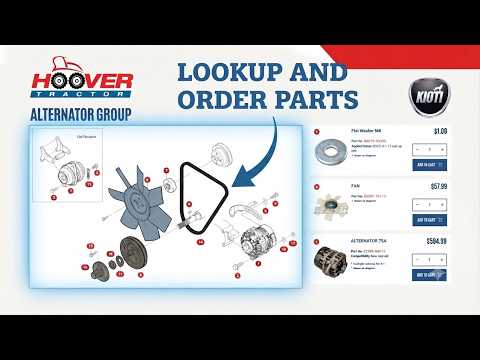
Each diagram shows an exploded view of that assembly. Numbered callouts on the diagram correspond to parts listed on the page.
Step 6: Find the Part on the Diagram
Use the numbered callouts to identify the part you need. You can click the number on the diagram or review the parts listed below or beside the diagram.
Each listed part may show details such as:
- Part name
- Part number
- Quantity shown on the diagram
- Price
- Add to cart option, when available
The “quantity shown” tells you the total quantity of that part used within the context of the diagram you are viewing. It is not always the exact number visibly shown in the illustration, and it does not always mean that quantity is needed for your repair.
Serial number breaks may apply to some parts. This means the correct part may depend on when your machine was built or where your serial number falls within a listed range. For help understanding serial number ranges, visit our Serial Number Decoder page. Please review your machine carefully before placing your order.
Step 7: Add the Part to Your Cart
Once you confirm the part is correct, enter the quantity you want to purchase and click “Add to cart.”
Some parts may not be available for online checkout. Large or oversized items may require truck freight, and some parts may need to be confirmed with our parts department before ordering.
You can continue browsing diagrams and adding parts to your cart before checking out.
Helpful Tips
Always confirm your model number and serial number before ordering. Many machines have similar model names, but small differences can affect which parts fit.
Use the diagram as a guide but compare it with your machine when possible. Parts may vary depending on serial number, options, cab/open-station (ROPS) configuration, or previous repairs.
If you are unsure which part you need, please contact us before ordering. Our parts team can help you confirm the correct part number.
When contacting us for help, please have the following information ready:
- Equipment brand
- Model number
- Serial number
- The diagram name or section you are viewing
- The part number or callout number, if available
- A photo of the part or area of the machine is helpful
Availability, Replacement Parts, and Truck Freight
Some parts shown in the diagrams may not be available to order directly online.
Large, heavy, or oversized parts may be marked as requiring truck freight. These parts cannot be checked out through the website because shipping costs and handling requirements may vary. Please contact our parts department for assistance with availability, freight options, and pricing.
Some parts may also be replaced, superseded, or discontinued by the manufacturer. We try to show replacement part information whenever it is available, but there may be additional options or updated replacement parts that are not yet shown on the website.
Our parts diagrams are an ongoing resource, and we continue to improve the information shown. If you are unsure whether a part is still available, has been replaced, or is correct for your machine, please contact us before placing your order.
Need Help?
If you are not sure which part to order, we are happy to help.
Contact the Hoover Tractor parts department using one of the methods below before placing your order. Providing your model and serial number helps us look up the correct information faster.
- Call (570) 966-3821 option 1
- Text us using the widget at the bottom left of every page.
- Use our Contact Us page